Live Tracking Impact Indicators Document
Summary:
This document explains a new feature called Live Tracking Impact Indicators. It helps you know when something on a user’s phone — like turning off GPS or enabling power saving — could affect live tracking.
Live tracking impact indicators:
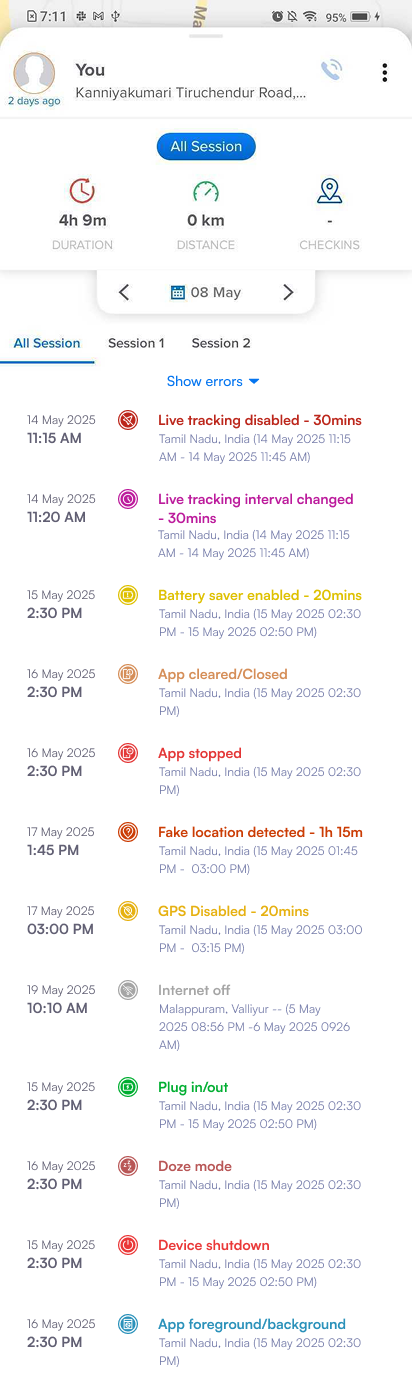
- You’ll now see a new tab called "Tracking Impact" in each user’s timeline — both on the web and mobile apps.
- This section clearly shows which actions (like turning off GPS or closing the app) might affect live tracking.
- For each issue, you will be able to see:
- Date & time
- Location
- Duration of issue
| S.No | Indicators | Icon | Meaning | Causes | How to fix |
| 1 | App Stopped | The Lystloc app is no longer working or running. | The app was forcefully stopped either: By the user via settings (Settings → Apps → Force Stop) By the device due to low memory | Reopen the app to resume tracking | |
| 2 | App Closed | This means the Lystloc app is closed | The user intentionally swiped it away from recent apps | Reopen the app | |
| 3 | App in Foreground | The app is currently open on the screen. | The user is currently using Lystloc | No Issue | |
| 4 | App in Background | The Lystloc app is still working, but it’s not on the screen. | After opening Lystloc, the user switched to another application without clearing from the recent apps | Ensure it's not force closed. | |
| 5 | Device plugged in (Charging) | The phone is charging | The user connected the charger | No action required | |
| 6 | App in Doze Mode | The Android system puts the app to sleep to save battery | Screen off, no activity, not charging | Turn off battery saving; keep Lystloc open | |
| 7 | Battery Saver enabled | The battery saver is turned on in the device | The user turned on battery saver | Turn off battery saver or whitelist Lystloc | |
| 8 | Device shut down | The phone is switched off | The user switched off their device | Turn on the device | |
| 9 | GPS turned off | The GPS is turned off | The user disabled their GPS/location | Enable GPS for location tracking | |
| 10 | Internet turned off | The internet is turned off | The user turned off their internet/Wifi | Turn on internet/ Wifi. Note: If offline tracking is enabled, your data will sync once the internet is back. |


Further, if anymore concerns, please reach out to support@lystloc.com